
/images/avatar.png

Semi-supervised text classification using doc2vec and label spreading

Here is a simple way to classify text without much human effort and get a impressive performance.

It can be divided into two steps:

  1. Get train data by using keyword classification
  2. Generate a more accurate classification model by using doc2vec and label spreading

Keyword-based Classification

Keyword based classification is a simple but effective method. Extracting the target keyword is a monotonous work. I use this method to automatic extract keyword candidate.
Parameters in doc2vec

Here are some parameter in gensim’s doc2vec class.

window

window is the maximum distance between the predicted word and context words used for prediction within a document. It will look behind and ahead.

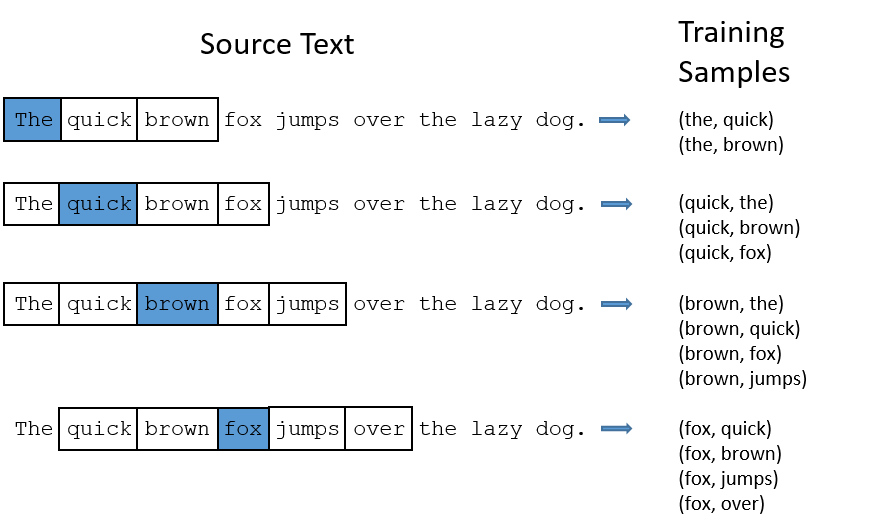
In skip-gram model, if the window size is 2, the training samples will be this:(the blue word is the input word)

min_count

If the word appears less than this value, it will be skipped

sample

High frequency word like the is useless for training. sample is a threshold for deleting these higher-frequency words. The probability of keeping the word \(w_i\) is:

Brief Introduction of Label Propagation Algorithm

As I said before, I’m working on a text classification project. I use doc2vec to convert text into vectors, then I use LPA to classify the vectors.

LPA is a simple, effective semi-supervised algorithm. It can use the density of unlabeled data to find a hyperplane to split the data.

Here are the main stop of the algorithm:

  1. Let $ (x_1,y1)…(x_l,y_l)$ be labeled data, $Y_L = \{y_1…y_l\} $ are the class labels. Let \((x_{l+1},y_{l+u})\) be unlabeled data where \(Y_U = \{y_{l+1}…y_{l+u}\}\) are unobserved, usually \(l \ll u\). Let \(X=\{x_1…x_{l+u}\}\) where \(x_i\in R^D\). The problem is to estimate \(Y_U\) for \(X\) and \(Y_L\).
  2. Calculate the similarity of the data points. The most simple metric is Euclidean distance. Use a parameter \(\sigma\) to control the weights.

\[w_{ij}= exp(-\frac{d^2_{ij}}{\sigma^2})=exp(-\frac{\sum^D_{d=1}{(x^d_i-x^d_j})^2}{\sigma^2})\]

Enable C Extension for gensim on Windows

These days, I’m working on some text classification works, and I use gensim ’s doc2vec function.

When using gensim, it shows this warning message:

C extension not loaded for Word2Vec, training will be slow.

I searched this from Internet and found that gensim has rewrite some part of the code using cython rather than numpy to get better performance. A compiler is required to enable this feature.

I tried to install mingw and add it into the path, but it’s not working.

Some Useful Shell Tools

Here are some shell tools I use, which can boost your productivity. Mordern-unix is a great repo that list lots of modern unix tools.

Prezto

A zsh configuration framework. Provides auto completion, prompt theme and lots of modules to work with other useful tools. I extremely love the agnoster theme.

Fasd

Help you to navigate between folders and launch application.

Here are the official usage example:

Start

Over the years, I have read so many programmers’ blogs, which has helped me a lot. Now I think it’s the time to start my own blog.

I hope this can enforce myself to review what I have learned, and it would even be better if someone can benefit from it.